PiKVM praise
I needed to buy another KVM recently.
Since I purchased my first PiKVM v4 Mini for $340 CAD, many cheaper options are available on the market, such as the JetKVM at ~$125 CAD and the NanoKVM at ~$100 CAD. Despite being significantly more expensive I purchased another PiKVM anyway.
Hackability
The PiKVM is running a customized arch Linux install, but the software stack is hackable.
For example, the PiKVM uses nginx as a reverse proxy, and it’s simple to modify to harden the web interface, such as:
Adding
ssl_protocols TLSv1.3;to enforce use of the latest TLS version.Adding
ssl_verify_client on;for mutual TLS.
Because of the PiKVM using a standard Linux kernel it also has standard networking features such as IPv6, whereas the cheaper JetKVM didn’t support IPv6 on launch, and it’s unclear if IPv6 support is fully functional today.
Performance
I have used many KVMs at work, and most have high latency, frequent video feed cutouts, and over-compressed video that makes it difficult to read low-contrast text.
The PiKVM v4 Mini’s performance is exceptional. The video quality and latency are second only to the much more expensive Raritan KVMs.
While I haven’t used the NanoKVM, GitHub comments indicate that enabling TLS has a noticeable performance impact.
Security
This is the most important part when I decided to buy another PiKVM. I follow a zero trust architecture and all web traffic on my local network uses TLS, even for devices that are accessible only on my local network.
Out-of-the-box the PiKVM has two-factor authentication with TOTP, and provides instructions to setup certbot to create valid TLS certificates with Let’s Encrypt.
The hackability of the PiKVM allows me to further harden the web interface with mutual TLS, requiring clients that connect to provide their own TLS certificate before the PiKVM presents the login page.
The JetKVM and NanoKVM didn’t support TLS when I first researched these devices. Both devices appear to now support TLS in a limited capacity, but documentation and details are sparse. In 2026 I don’t think it’s appropriate for any device to ship without basic security, or to implement basic security as an afterthought.
PiKVM improvements
Not everything about the PiKVM is perfect, and I do have some minor complaints.
The display isn’t large enough to fit an entire IPv6 address.
pikvm-updateresulted in a non-functional KVM once. This issue got fixed in a day by the PiKVM manufacturer.The power supply included with my first PiKVM had considerable coil whine. I replaced the power supply with another USB-C Raspberry Pi power supply. My second PiKVM power supply didn’t have this problem.
The API requires storage of the 2FA TOTP private key.
The OLED screen on my first PiKVM suffers from burn-in and is noticeably dimmer compared to my second PiKVM. I suspect the display may be unusable in a couple of years if the degradation continues.
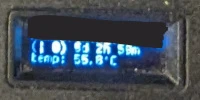
PiKVM display after a year of use. Some pixels are worse than others.
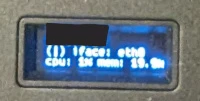
PiKVM display from my new new PiKVM.
Conclusion
I recommend the PiKVM v4 Mini to anyone looking for an IP KVM. There are cheaper KVMs on the market, but they struggle with basic features such as TLS and IPv6 that work out-of-the-box on the PiKVM.